In an era where data is crucial to operations and business growth, many organizations manage vast amounts of data, including sales figures, employee numbers, expenses, and performance results. Accessing data from multiple files or systems can be time-consuming and make it difficult to gain an overview. Dashboards are tools that simplify data visualization by consolidating key information and presenting it in easily understandable formats such as graphs, tables, numbers, and charts. This helps users visualize the big picture and make more informed decisions.
What is a dashboard ?
A dashboard is a screen that displays important data from various sources , presenting it in a format that helps users quickly understand the situation.
Examples of data that can be displayed on a dashboard include:
- Daily or monthly sales figures.
- Number of employees in the organization
- Employee turnover rate
- Performance results of each department.
- Expenses and budget
- Progress toward the set goals.
The key feature of a dashboard is its ability to transform large amounts of data into an easy-to-read overview, reducing data searching time and highlighting key points more clearly.
What are the benefits of a dashboard ?
- It helps me understand the information quickly.
Instead of having to read multi-page reports, users can view key figures and graphs on a single screen, making it easier to understand the situation from a basic perspective.
- Helps in making decisions.
When relevant information is available in one place, managers and staff can use the data to make more systematic decisions.
- It's easy to track performance.
The dashboard can display performance results compared to set targets, such as actual sales achieved versus the target, or the number of employees recruited versus the plan.
- Identifying problems and trends.
Displaying both historical and current data helps users observe changes, such as declining sales or an increasing turnover rate.
- Reduce the time spent preparing reports.
When connected to data sources and with proper update settings, a dashboard can help streamline the manual data collection and report generation process.
How many types of dashboards are there ?
Dashboards can be categorized into three main types based on their purpose.
- Strategic Dashboard
Used to track the overall performance and key goals of an organization. Suitable for executives who want to view long-term performance.
Examples: Total revenue, profit, business growth, and performance compared to annual targets.
- Operational Dashboard
It is used to track daily or periodic activities so that the situation can be monitored and problems resolved quickly.
Examples: The number of pending orders, the number of completed tasks, or the number of employees absent each day.
- Analytical Dashboard
Use in-depth data analysis to identify trends, relationships, or causes that may affect performance.
Examples: Analyze sales by area, compare performance over each quarter, or analyze turnover rates by department.
All three types may have similar display formats, but they differ in purpose and level of information detail.
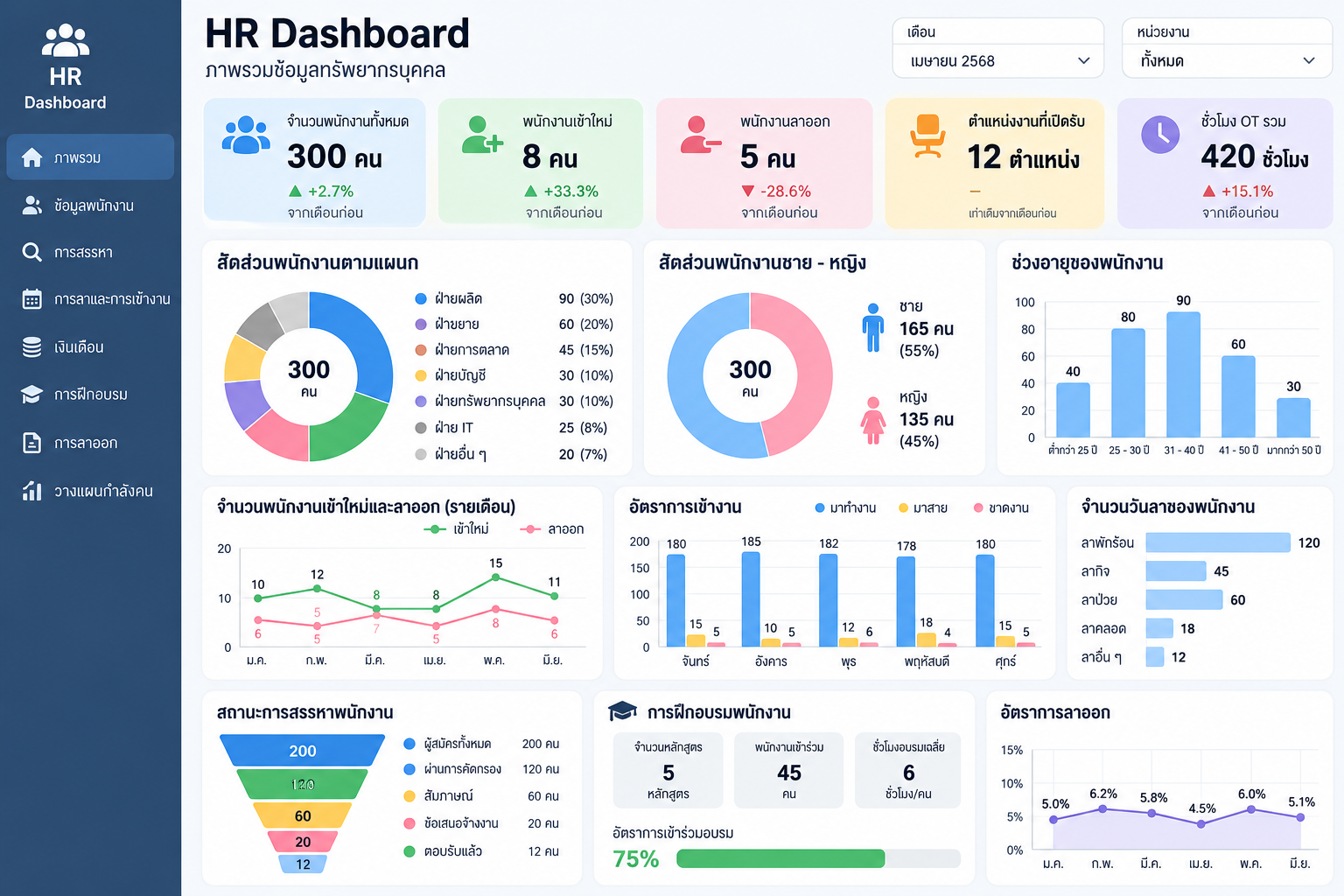
Dashboards aren't limited to accounting or sales departments; they can also be used in human resources (HR) to help manage people more efficiently.
- HR Dashboard
Used to display an overview of employee information, such as the total number of employees, the number of new hires, and the number of employees who have left.
- Recruitment Dashboard
It is used to track recruitment results, such as the number of applicants, the number of candidates who passed the interview, the recruitment period, and the number of open positions.
- Attendance Dashboard
It is used to track employee attendance, absenteeism, tardiness, and leave, helping HR gain an overview of work time management.
- Training Dashboard
It is used to track training activities, such as the number of employees attending training, training hours, and post-training evaluation results. This data helps HR prepare reports, analyze the situation, and present relevant information to management more easily.
There are many types of tools that can be used to create dashboards, such as:
- Microsoft Excel: Ideal for beginners and organizations that already have data in Excel.
- Microsoft Power BI: Ideal for gathering data from multiple sources and creating analytical reports.
- Looker Studio: Ideal for creating reports and dashboards that can be shared with others.
- HRM Software: Suitable for organizations that want to display employee data directly from their HR system. The specific functions of each system depend on its features.
Precautions to take when using the Dashboard.
While dashboards can make work easier, effective use should take into account the following:
- Data accuracy: If the source data is incorrect, the displayed results may also be inaccurate.
- Selecting Key Performance Indicators (KPIs): Choose KPIs that align with your goals, rather than those that unnecessarily display large numbers.
- Security: Access rights, especially for employee data, salaries, and personal information, should be appropriately defined.
- Interpreting data : Numbers and graphs can help identify trends , but context and contributing factors should be considered before making decisions.
Dashboards are tools that transform large amounts of data into an easy-to-understand overview, allowing users to track performance, identify trends, and make informed decisions more easily. Whether in sales, finance, organizational management, or human resource management, dashboards can help streamline workflows and improve data utilization efficiency.
Posted by

Posted by

What is telesales What are their responsibilities It's a career that helps increase sales for a business.
In business competition, success isn't solely dependent on product quality, but also on the ability to reach and meet customer needs. Telesales is therefore a crucial role in driving sales and creating business opportunities for organizations through communication and presenting products and services via telephone...


What is After Sales Service, and why is it important for modern businesses to prioritize it?
In today’s competitive business environment, success does not end when a “sale is made.” What happens after a customer decides to make a purchase is equally important, because customers in the digital age are looking for more than just a product...


Do foreign employees have to contribute to the employee welfare fund?
Today, many organizations in Thailand employ foreign workers, including operational staff, specialists, and executives. This makes it essential for HR departments to understand the rights and responsibilities under...


What is unpaid leave? How does it differ from "No Work, No Pay"?
Employee leave in companies comes in many forms. This article will explain that "Leave Without Pay (LWOP)" and "No Work No Pay" are not the same thing. Although the result is the same—employees do not receive wages —they have different...

